
Lecture notes
Keep a definition, the diagram that explains it and the question you still need to answer. Use the timestamp to revisit the original explanation.
How to take notes from YouTube lectures →YOUTUBE NOTE-TAKING FOR CHROME
Save the useful frame, add your explanation and keep its timestamp. Clip Insights turns a YouTube study session into notes you can download as a PDF.
Add to ChromeFor YouTube watch pages on desktop Chrome. Local notes, screenshots and PDF downloads work without an account, within guest limits.
See a finished study-notes example →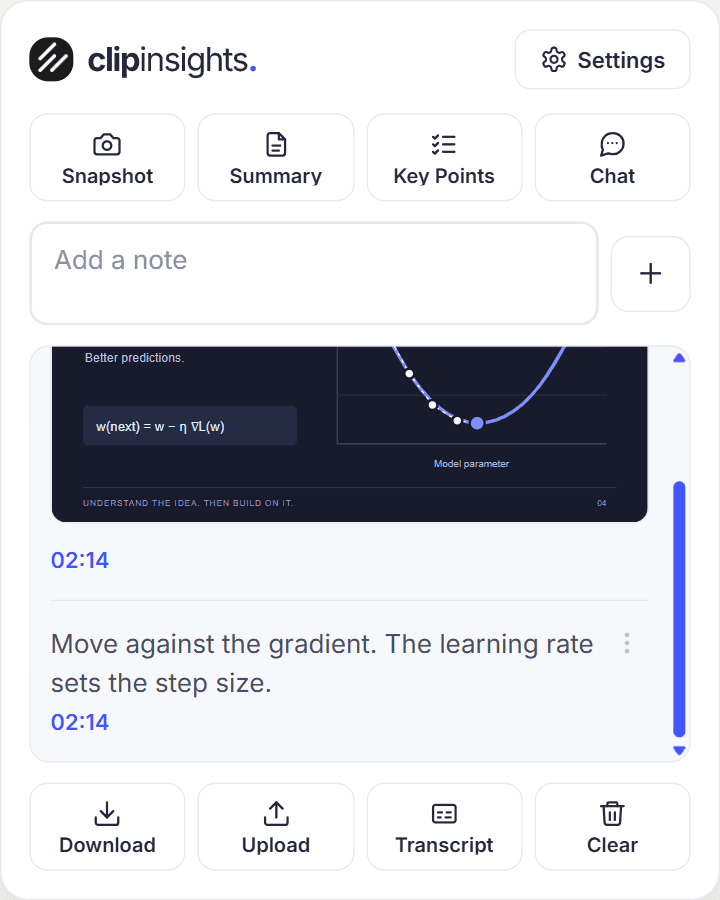
FROM WATCHING TO WORKING NOTES
Write in the panel while watching. Your note stays associated with the playback time so you can return to the relevant part of the video.
Select Snapshot for a diagram, slide or code example. Add a separate note explaining why you kept it. A screenshot records the frame; your words record the reasoning.
Select Download to create your PDF. Open the file and check its contents. Signed-in users can also upload the PDF to their web library.
Keep a definition, the diagram that explains it and the question you still need to answer. Use the timestamp to revisit the original explanation.
How to take notes from YouTube lectures →Capture the important code change and explain why it was made. Finish with a small task you can try in your own project.
A programming tutorial note-taking workflow →Review your notes and screenshots, then export a PDF. Keep the document with your coursework so it is useful after the browser tab closes.
Export YouTube notes and screenshots to PDF →Try timestamped notes, video screenshots and PDF downloads. Compare current guest and account limits before choosing a plan.
Use transcript-based summaries, key points and video chat within your allowance. Upload finished PDFs to your library. AI requires a usable transcript and can miss information shown only in the video’s visuals.
Your editable timeline stays in this browser and is cleared after five days. Download a PDF to keep your work. Uploading the PDF does not automatically sync editable notes between devices.
The extension is for desktop Chrome. You can access uploaded PDFs through the web app on another device; that does not install the study panel in a mobile YouTube app.
Your own notes, screenshots and PDF downloads do not depend on a transcript. The transcript is needed for the AI tools. You can keep studying manually when captions are unavailable.